
How do I read balances?
What the Debts screen shows, where each balance comes from and how to change it.
In a shared budget, people take turns paying expenses. Boney compares what each person paid with the share they owed according to the split, and shows the difference: that is the balance. You have nothing to calculate or enter.
Opening the Debts screen
- On the home screen, scroll down to the Debts section. It only appears while at least one balance is still open.
- Tap Watch more.
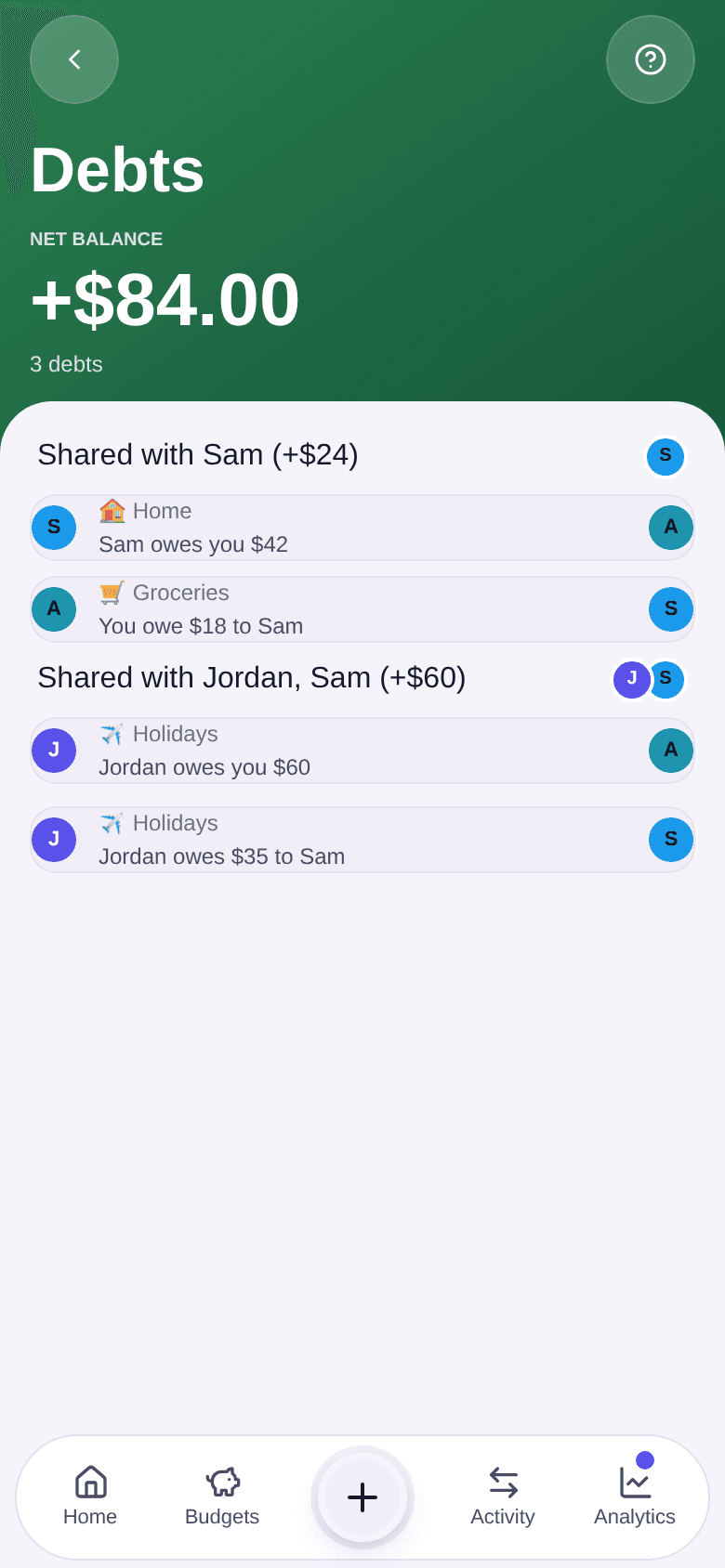
Reading the screen, with an example
At the top, the Net balance adds up everything you are owed and subtracts everything you owe, across all budgets. Below it, the number of debts that involve you.
Balances are then grouped by the people you share budgets with. In the picture:
- in Home, Sam owes you $42;
- in Groceries, you owe $18 to Sam;
- so the “Shared with Sam” group shows +$24: 42 − 18.
Each budget keeps its own balances: Boney does not mix the $42 from Home with the $18 from Groceries. Within one budget, though, everything is already offset: if Sam owes you $30 and you owe Sam $20, you only read “Sam owes you $10”.
A row can also involve two other people, such as “Jordan owes $35 to Sam” in Holidays. It does not count in your net balance, but you see it because you take part in the budget.
When everything is paid back, the screen shows “All settled up”.
Changing a balance
A balance is never edited directly. Two things move it:
- correcting an expense in the budget (its amount, who paid it or its split);
- recording a reimbursement: tap the balance row to open the budget it belongs to, then follow the steps to record a reimbursement.
Good to know
- Each expense counts with the split it had when it was recorded. Changing the budget's split today does not change the balances of expenses already recorded. See how to set a budget's split.
- An expense planned for a future date only counts in balances once that date arrives.